


MyWalmart
4.516.62K Reviews
App Specs
- Version
- 2.13.1
- Updated On
- License
- Free
- Downloads
- 1,000,000+
- Developer
- Walmart
- Categories
- Business
- Platform
- Android, iOS
Screenshots


 Analysis by AppCompare
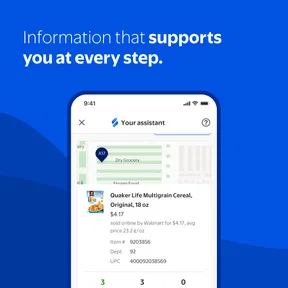
If you’re considering installing MyWalmart, the first thing to know is who it is actually for: Walmart store associates. I would not approach it as a shopping app or a general business tool. Its value is in giving employees a place to handle work-related information, so the useful question is whether it fits into your store routine and helps you find what you need without extra calls or searching around.
What to expect as a first-time user
The app is a free business app developed by Walmart, and its audience is specific rather than broad. It is rated for Everyone, but that age label does not mean every feature is intended for every user: the app is described as being available to store associates. If you are not an associate, it is unlikely to be useful as a day-to-day companion, and you should not expect the kind of product browsing or order tracking associated with Walmart’s customer-facing tools.
Its popularity is substantial, with more than a million installs and an average rating of 4.6 from around 245,000 ratings. Those figures suggest that many people find it useful, but they are not a promise that every task will feel effortless on every device. I would judge it by a practical test: can you reach the work information you need at the moment you need it?
The app was released on October 30, 2019, and its current version is 2.6.2, with Android 9 as the minimum operating system. That gives you a simple check before troubleshooting: if your phone meets that requirement, you can rule out an older Android version as the immediate reason it will not install. The release date also places it as an established work app, rather than something built around a brief promotion or one-off event.
Before you install: set the right expectations
The original description of MyWalmart focuses on store associates, so I would start by confirming that you are part of that audience before spending time setting it up. A personal Walmart shopping account is not the same thing as access to an employee work tool. If the app asks you to sign in and your usual consumer credentials do not take you where you expect, that mismatch is a likely point of confusion; use the access route provided for your associate role rather than repeatedly trying unrelated accounts.
I also recommend installing it with enough time to sort out access before you need it for a shift. Work tools are most frustrating when you first open them in a hurry, with a schedule question or payroll task already waiting. Get through the initial sign-in when you are not under pressure, then take a moment to identify where the important information sits. That small bit of preparation can make the app more useful later, even if you only open it briefly between other tasks.
Getting Started with MyWalmart
The first thing you'll notice when you fire up the MyWalmart app is its clean and straightforward interface. It's designed to be user-friendly, which is perfect for those who aren’t super tech-savvy. Setting it up is a breeze. All you need is your Walmart login information, and you're good to go. It's like having a mini Walmart hub right in your pocket.
Worth Reading Before You Choose

EA SPORTS FC Mobile 26 Is a Bigger Football Game, but It Takes Time

Flipboard Shows What News Apps Must Do Beyond the Feed

Switching to Android Auto Means Rethinking Your Driving Routine

Google Calendar Makes a Crowded Week Easier to Manage

Ludo King Makes the Most of the Minutes Between Plans

Baby Panda World Brings Quick Play to Modern Phones, but Its Game Library Feels Busy
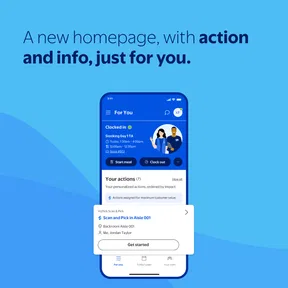
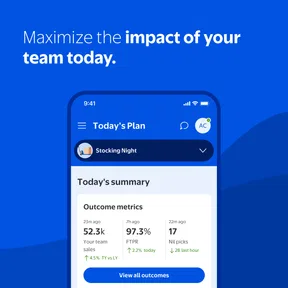
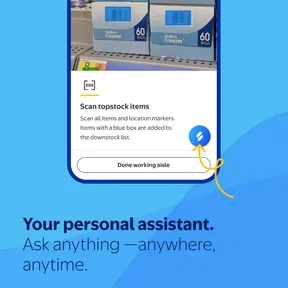
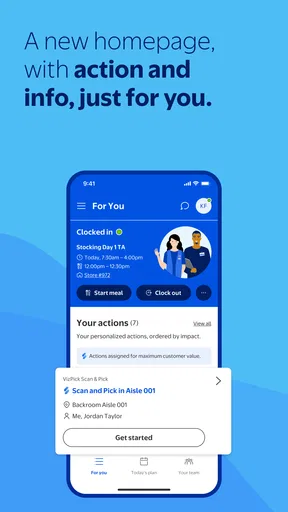
Once you're in, the home screen presents you with a variety of features. You've got your work schedule, company news, and even payroll information all in one place. It's like having your own personal Walmart assistant.
The Features You'll Love
One of the standout features of the app is its scheduling tool. You can easily view your upcoming shifts, request time off, and even swap shifts with coworkers. It's incredibly convenient for planning your week without having to constantly check a bulletin board or call the store.
Another cool feature is the news section. Staying updated with the latest company happenings has never been easier. Whether it's a new store opening, policy changes, or special employee events, you'll find it all here.
But that's not all. The app also gives you access to your pay stubs and benefits information. It's all about putting the control back in your hands. No more waiting for HR to get back to you about a simple payroll question. Everything you need is just a tap away.
Turning the first sign-in into a useful routine
Your first successful action does not need to be complicated. I would begin by checking the next scheduled shift, then compare it with whatever you already use to plan your week. If the details line up, you have confirmed that the app is doing something practical for you. From there, look at the time-off or shift-swap options only when you have a real need; these are work actions, so it is sensible to read each screen carefully and make sure you understand the request before submitting it.
A useful habit is to treat the schedule as a reference point, not as a replacement for your own planning system. If you coordinate childcare, transport, or a second commitment, note the shift in your calendar after checking it in the app. That gives you a backup view and makes changes easier to notice. For a shift swap, check the outcome in the app rather than assuming that starting a request means it has been accepted. The distinction between asking and having a change confirmed matters in any workplace scheduling tool.
Pay information is another good first-week check. Open it when you have a specific question, such as wanting to review a pay stub or find benefits details, instead of tapping around without a purpose. That makes it easier to recognize the right information and spot whether you need help from the appropriate workplace contact. The app can reduce the effort of locating information, but it does not remove the need to follow up when a work or payroll issue needs a person to resolve it.
Using it during an ordinary workweek
Picture a familiar situation: you are planning the week on a day off and cannot remember whether your next shift starts early or later. Instead of calling the store or relying on a photograph of a bulletin board that may be out of date, you open the schedule and check the shift there. You can then make a transport plan and add the time to your personal calendar. That is a modest task, but it is exactly the sort of repeat question a work app can make less of a hassle.
For a time-off request, I would use the same deliberate approach. Check the schedule first so you understand which days are affected, then follow the request flow and keep track of whether the request has been approved. If you need to coordinate with a coworker, do not treat a shift-swap request as a completed arrangement until you can see that the change is settled. The convenience is real, but the responsibility to verify the final status remains with you.
The news area is best used as a quick check when you want to stay aware of company updates, not as a substitute for asking a manager about how a change applies to your particular shift or store. A general announcement can provide context, while a local work question may still need a direct answer. Keeping those two jobs separate helps prevent a common misunderstanding: seeing a company update does not automatically tell you what action to take in an individual situation.
Where confusion and friction can appear
The main confusion for a new user is the difference between an employee tool and the Walmart app used by shoppers. They serve different purposes. If your goal is to browse products or manage a customer purchase, a shopping app is the better choice. If you are an associate trying to check work information, MyWalmart is the more relevant place to start. Choosing the right app matters more than repeatedly trying to make one serve both roles.
Login trouble can also interrupt the first session. The published experience notes occasional sign-in issues, and a stable internet connection is important for using the app smoothly. If the screen does not load as expected, first check your connection and confirm that you are using the account associated with your associate access. If the problem continues, avoid guessing at credentials or submitting the same action repeatedly; use the proper support route for your workplace account.
There is a learning curve because several kinds of work information sit together. I would not try to memorize every section in one sitting. Find the schedule first, then learn where company news and payroll or benefits information are located as those needs arise. That is more manageable than treating the home screen as a tour you must finish immediately. The app is more useful when you know where to go for a particular task than when you simply browse through everything once.
One practical trade-off is that a phone-based work hub can make information easier to reach, but it also ties that access to your device, connection, and successful sign-in. If you have a shift-related question and the app is unavailable at that moment, a manager or the store’s usual communication method may be the faster option. I would keep those alternatives in mind rather than relying on a single app for anything time-sensitive.
Who will get the most from it
I think the app makes the most sense for store associates who regularly need to check shifts, keep up with company news, or find pay and benefits information. It is especially useful if you have previously relied on several separate reminders or had to contact someone for information you can now look up yourself. Its strength is not that it replaces every workplace conversation; it is that it can make routine information easier to find when you are planning your own time.
It is less compelling for someone who is not a Walmart associate, someone who only wants a shopping tool, or anyone who prefers to handle every work question through a manager or another established channel. It may also be a poor fit as your only source for urgent updates if you cannot count on having your phone or a reliable connection available. In those cases, the app can still be a useful reference when accessible, but it should not be your sole plan.
Compared with a paper schedule or a call to the store, the app offers a more direct way to check work details without depending on a printed notice or reaching another person for a routine lookup. Compared with a general calendar, it is more workplace-focused, while the calendar remains better for combining shifts with appointments and personal commitments. I would use them together: check the work schedule in the app, then put confirmed shifts into the calendar you already use.
Why MyWalmart Stands Out
What really sets the MyWalmart app apart is its focus on user convenience. It's designed to make life easier for Walmart employees, which is a huge plus. You're not just another cog in the machine; this app makes you feel valued and informed.
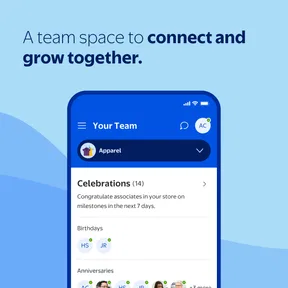
There's also a social aspect to it. You can connect with other employees, share tips, and even offer support. It's like a mini community within the massive Walmart family.
And let's not forget about the app’s performance. It's smooth, responsive, and rarely crashes. Nothing's worse than an app that feels like it's stuck in quicksand, but thankfully, this isn't one of them.
A Few Things to Keep in Mind
Now, while the app is pretty great, it's not without its hiccups. Some users have mentioned occasional login issues, but these are usually resolved with a quick app update. It's also worth noting that a stable internet connection is a must for optimal performance.
Another point is that, while the app is packed with features, it might feel a bit overwhelming at first. But once you get the hang of it, navigating through becomes second nature.
Keeping expectations realistic
For me, the best way to think about this tool is as a convenient access point, not a guarantee that every work question will be answered inside one screen. A schedule lookup or a pay-stub check is a clear, self-contained task. A complicated payroll concern, a disagreement about a shift, or a question about how a policy applies to you may need a conversation with the right person. Knowing the difference keeps the app from feeling disappointing when the next step is outside it.
It also helps to distinguish information from action. Reading a news item is not the same as confirming a change to your own responsibilities, and opening a request screen is not the same as knowing the request has been approved. I recommend checking the relevant status after any task that affects your schedule. That simple habit is more valuable than tapping quickly through the app and assuming every step has finished.
If you are deciding whether it is worth installing, ask yourself what you currently do when you need a shift detail or payroll information. If the answer is that you search through old messages, look for a posted schedule, or contact someone for a basic lookup, having an associate-focused app may save friction. If those needs rarely come up, or you are not part of the intended workplace audience, it may not add much to your phone.
Final Thoughts
All in all, the MyWalmart app is a fantastic tool for anyone tied to the Walmart universe. It's efficient, easy to use, and genuinely makes handling work-related tasks a breeze. If you're part of the Walmart team, this app is definitely worth a download. It’ll make your work life smoother and keep you connected with everything that’s happening. So, why not give it a whirl? You might just find it’s exactly what you’ve been missing.
My recommendation is more specific: if you are a Walmart store associate, install it when you have time to sign in calmly, start with your schedule, and then explore the sections you need for news, pay, or benefits. Keep your regular workplace contact and personal calendar as useful backups, especially for questions that need confirmation or a human answer. For the right person, that makes MyWalmart a practical work companion rather than just another icon on the home screen.
Pros
- User-friendly interface enhances navigation.
- Comprehensive employee resources in one place.
- Seamless scheduling and shift management.
- Easy access to company announcements.
- Integrated communication tools for teams.
Cons
- Occasional login issues reported by users.
- Limited offline functionality available.
- Notifications can be overly frequent.
- Some features require stable internet.
- Initial setup can be time-consuming.
FAQs for MyWalmart
What is MyWalmart and what features does it offer?
MyWalmart is an application designed for Walmart employees to manage their work schedules, access pay stubs, and stay updated with company news. It offers features such as shift scheduling, time-off requests, team communication, and access to employee benefits. The app aims to streamline work-related tasks and improve communication within the workplace.
Is the MyWalmart app free to use for all employees?
Yes, the MyWalmart app is free for all Walmart employees. It is designed to facilitate work-related management, making it easier for staff to handle their schedules and access essential company information. There are no hidden fees or subscriptions required to use the app’s core features.
How secure is the MyWalmart app regarding personal information?
The MyWalmart app prioritizes user security and employs robust encryption methods to protect personal information. It requires secure logins and offers additional security features like two-factor authentication. Users should ensure they keep their login credentials confidential to maintain security.
Can the MyWalmart app be accessed on both Android and iOS devices?
Yes, the MyWalmart app is available for both Android and iOS devices. Employees can download it from the respective app stores—Google Play for Android users and the App Store for iOS users. It is compatible with most modern smartphones and tablets.
What should I do if I encounter issues with the MyWalmart app?
If you experience any issues with the MyWalmart app, you should first check for updates, as newer versions often fix known bugs. If problems persist, contact Walmart’s technical support for assistance. They can provide guidance and help resolve any technical difficulties you might face.


